Badges
The badges component can be used to display any generic Key/Value data in a more condensed view. Optionally, you can also omit they Key/Value and display only one.
Dynamic Content
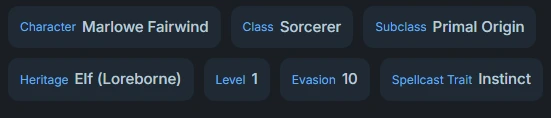
Badges support dynamic content using template variables with {{ }} style templates. This allows creating badges with data from the frontmatter or even calculations based off abilities or skills. This is great for things like
- Level
- Armor Score
- Evasion
Using dynamic content helps keep your character sheet updated as you level up.
See the Events (API) page for more information on using templates.
Example
yaml
```badges
items:
  - label: Character
    value: "{{ frontmatter.name }}"
  - label: Class
    value: "{{ frontmatter.class }}"
  - label: Subclass
    value: "{{ frontmatter.subclass }}"
  - label: Heritage
    value: "{{ frontmatter.ancestry }} ({{ frontmatter.heritage }})"
  - label: Level
    value: "{{ frontmatter.level }}"
  - label: Evasion
    value: "{{ frontmatter.evasion }}"
  - label: Spellcast Trait
    value: "{{ frontmatter.spellcast_trait }}"
```
configuration
| Property | Type | Default | Description |
|---|---|---|---|
items | Array | Required | List of badge items to display |
styleClass | String | none | Optional CSS class name applied to the outer badges container |
reverse | Boolean | false | When true, render value before label instead of label → value |
Item
| Property | Type | Description |
|---|---|---|
label | String | Label text (optional) |
value | String / Number / Bool | Value to display (optional) |
See also
- Traits – source of
traits.*values you can show in badges. - Dynamic Content – full reference for template usage.
- State Storage – background on how other blocks persist values that badges often display.