Features
The features component is used to display ancestry, class, subclass, and community features in a structured, readable layout. It supports multiclass and multi‑subclass setups, grouping features by their source (e.g. class name) and tier.
You can use it for:
• Ancestry traits
• Class features
• Subclass tiers (Foundation / Specialization / Mastery)
• Community / background features
Dynamic Content
Feature values support dynamic content using template variables with {{ }} style templates. This lets you pull in values from frontmatter or calculated values, for example:
• Show a damage bonus that depends on level.
• Reference a trait or ancestry name stored in frontmatter.
• Inject small Markdown snippets (bold, lists, etc.) into feature text.
Templates are processed the same way as in other blocks (badges, vitals, damage, etc.).
See the Events (API) page for more information on using templates.
Example – Single‑class
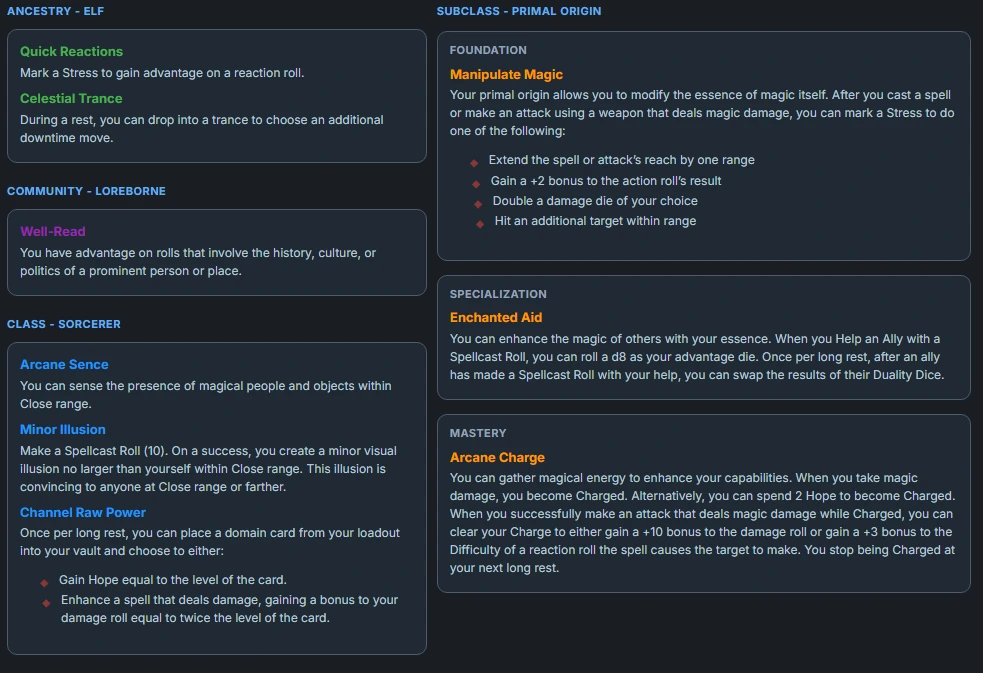
```features
styleClass:
layout: grid
ancestry:
  - from: "Elf"
    label: "Quick Reactions"
    value: "Mark a Stress to gain advantage on a reaction roll."
  - from: "Elf"
    label: "Celestial Trance"
    value: "During a rest, you can drop into a trance to choose an additional downtime move."

community:
  - from: "Loreborne"
    label: "Well‑Read"
    value: "You have advantage on rolls that involve the history, culture, or politics of a prominent person or place."

class:
  - from: "Sorcerer"
    label: "Arcane Sence"
    value: "You can sense the presence of magical people and objects within Close range."
  - from: "Sorcerer"
    label: "Minor Illusion"
    value: "Make a Spellcast Roll (10). On a success, you create a minor visual illusion no larger than yourself within Close range. This illusion is convincing to anyone at Close range or farther."
  - from: "Sorcerer"
    label: "Channel Raw Power"
    value: |
      Once per long rest, you can place a domain card from your loadout into your vault and choose to either:
      - Gain Hope equal to the level of the card.
      - Enhance a spell that deals damage, gaining a bonus to your damage roll equal to twice the level of the card.

subclass:
  - from: "Primal Origin"
    tier: "Foundation"
    label: "Manipulate Magic"
    value: |
     Your primal origin allows you to modify the essence of magic itself. After you cast a spell or make an attack using a weapon that deals magic damage, you can mark a Stress to do one of the following:
      - Extend the spell or attack’s reach by one range
      - Gain a +2 bonus to the action roll’s result
      - Double a damage die of your choice
      - Hit an additional target within range

  - from: "Primal Origin"
    tier: "Specialization"
    label: "Enchanted Aid"
    value: "You can enhance the magic of others with your essence. When you Help an Ally with a Spellcast Roll, you can roll a d8 as your advantage die. Once per long rest, after an ally has made a Spellcast Roll with your help, you can swap the results of their Duality Dice."

  - from: "Primal Origin"
    tier: "Mastery"
    label: "Arcane Charge"
    value: "You can gather magical energy to enhance your capabilities. When you take magic damage, you become Charged. Alternatively, you can spend 2 Hope to become Charged. When you successfully make an attack that deals magic damage while Charged, you can clear your Charge to either gain a +10 bonus to the damage roll or gain a +3 bonus to the Difficulty of a reaction roll the spell causes the target to make. You stop being Charged at your next long rest."
```
Example Multiclass Sorcerer (Primal Origin) & Druid at Level 10
This example shows a level 10 character who started as a Sorcerer (Primal Origin) and took Druid (Warden Of The Elements) as a multiclass at level 5, gaining the Druid class feature, access to one of the Druid’s domains, and the Foundation card of a Druid subclass and grapped the upgrade to the Sorcerer Subclass to get Specilization.
```features
styleClass:
layout: grid

ancestry:
  - from: "Elf"
    label: "Quick Reactions"
    value: "Mark a Stress to gain advantage on a reaction roll."
  - from: "Elf"
    label: "Celestial Trance"
    value: "During a rest, you can drop into a trance to choose an additional downtime move."

community:
  - from: "Loreborne"
    label: "Well‑Read"
    value: "You have advantage on rolls that involve the history, culture, or politics of a prominent person or place."

class:
  - from: "Sorcerer"
    label: "Arcane Sence"
    value: "You can sense the presence of magical people and objects within Close range."
  - from: "Sorcerer"
    label: "Minor Illusion"
    value: "Make a Spellcast Roll (10). On a success, you create a minor visual illusion no larger than yourself within Close range. This illusion is convincing to anyone at Close range or farther."
  - from: "Sorcerer"
    label: "Channel Raw Power"
    value: |
      Once per long rest, you can place a domain card from your loadout into your vault and choose to either:
      - Gain Hope equal to the level of the card.
      - Enhance a spell that deals damage, gaining a bonus to your damage roll equal to twice the level of the card.
  - from: "Druid"
    label: "Beastform"
    value: |
      Mark a Stress to magically transform into a creature of your tier or lower from the Beastform list. You can drop out of this form at any time. While transformed, you can’t use weapons or cast spells from domain cards, but you can still use other features or abilities you have access to. Spells you cast before you transform stay active and last for their normal duration, and you can talk and communicate as normal. Additionally, you gain the Beastform’s features, add their Evasion bonus to your Evasion, and use the trait specified in their statistics for your attack. While you’re in a Beastform, your armor becomes part of your body and you mark Armor Slots as usual; when you drop out of a Beastform, those marked Armor Slots remain marked. If you mark your last Hit Point, you automatically drop out of this form.
  - from: "Druid"
    label: "Wildtouch"
    value: "You can perform harmless, subtle effects that involve nature—such as causing a flower to rapidly grow, summoning a slight gust of wind, or starting a campfire—at will."

subclass:
  - from: "Primal Origin"
    tier: "Foundation"
    label: "Manipulate Magic"
    value: |
      Your primal origin allows you to modify the essence of magic itself. After you cast a spell or make an attack using a weapon that deals magic damage, you can mark a Stress to do one of the following:
      - Extend the spell or attack’s reach by one range
      - Gain a +2 bonus to the action roll’s result
      - Double a damage die of your choice
      - Hit an additional target within range
  - from: "Primal Origin"
    tier: "Specialization"
    label: "Enchanted Aid"
    value: "You can enhance the magic of others with your essence. When you Help an Ally with a Spellcast Roll, you can roll a d8 as your advantage die. Once per long rest, after an ally has made a Spellcast Roll with your help, you can swap the results of their Duality Dice."
  - from: "Warden Of The Elements"
    tier: "Foundation"
    label: "Elemental Incarnation"
    value: |
      Mark a Stress to Channel one of the following elements until you take Severe damage or until your next rest:
        - Fire: When an adversary within Melee range deals damage to you, they take 1d10 magic damage.
        - Earth: Gain a bonus to your damage thresholds equal to your Proficiency.
        - Water: When you deal damage to an adversary within Melee range, all other adversaries within Very Close range must mark a Stress.
        - Air: You can hover, gaining advantage on Agility Rolls.
```
The block will:
- Group Ancestry, Class, and Community entries by
from(source name), with headings like “Class – Warrior”. - Group Subclass entries by
fromand then bytier(Foundation,Specialization,Mastery, orOther).
Using multiple features blocks for layout
You can place more than one features block in the same note. Each block can include any combination of the supported sections (ancestry, class, subclass, community), which lets you split features across different parts of your layout.
For example, you might keep ancestry and community on the left, and class / subclass on the right:
```features
styleClass:
layout: grid
ancestry:
  # Elf ancestry card
community:
  # Community card
```

```features
styleClass:
layout: grid
class:
  # Sorcerer and Druid class features
subclass:
  # Primal Origin and Warden of the Elements subclass cards
```
Each features block is rendered independently; grouping by from and tier still works within that block.
Configuration
Top‑level features block options:
| Property | Type | Default | Description |
|---|---|---|---|
styleClass | String | none | Optional CSS class name applied to the features container (preferred styling hook). |
layout | String | list | Overall layout: list (stacked) or grid / masonry. |
cols | Number | none | Optional preferred number of columns for grid/masonry layouts (used via a CSS variable). |
ancestry | Array | [] | Ancestry features. |
class | Array | [] | Class features (see notes below about the class key). |
subclass | Array | [] | Subclass features (supports from + tier grouping). |
community | Array | [] | Community / background features. |
Feature Item
Each entry under ancestry, class, subclass, or community is an object:
| Property | Type | Description |
|---|---|---|
label | String | Short label/title for the feature (optional but recommended). |
value | String / Number / Bool | Description text or Markdown content (templates allowed). |
from | String | Source name (e.g. "Warrior", "Invoker", "Sentinel"). Used for grouping. |
tier | String | Tier or slot label (e.g. "Foundation", "Specialization", "Mastery"). Used to bucket subclass features. |
fromandtierare optional, but they unlock the smarter grouping:- For
ancestry,class,community: cards are grouped byfrom(source) with headings. - For
subclass: cards are grouped byfrom(subclass name), then bytier(Foundation / Specialization / Mastery / Other).
- For
This gives you a flexible way to mirror Daggerheart’s ancestry/class/subclass/community structure while keeping the YAML close to the rules text.