Vitals
The vitals block renders a 4‑slot tracker grid for a character’s core resources:
• HP – rectangular boxes.
• Stress – rectangular boxes.
• Armor – rectangular boxes.
• Hope – diamond‑shaped boxes.
It supports:
• Custom labels (e.g. “Wounds” instead of “HP”).
• Numeric or template‑driven max values (e.g. from frontmatter).
• Persistent state per tracker using stable keys, shared with rest, damage, and the single‑tracker blocks (hp, stress, armor, hope).
• Optional Hope Feature rows under the Hope track for “once per rest” abilities or notes.
The block is registered under two names:
• vitals – primary name.
• vital-trackers – alias, for readability.
How the trackers work
Each of the four trackers draws a row of boxes:
• Click a box to fill or unfill it.
• Filled boxes are saved using a state key (like din_health, din_stress::Characters/Marlowe).
• When you reopen the note, the filled counts are restored from the state store.
These same keys are what rest and damage use to apply healing and damage.
Default keys and overrides
By default (per‑note defaults based on the current file path):
• hp_key: "din_health::NOTE_PATH"
• stress_key: "din_stress::NOTE_PATH"
• armor_key: "din_armor::NOTE_PATH"
• hope_key: "din_hope::NOTE_PATH"
Where NOTE_PATH is your Obsidian note path (for example, Characters/Marlowe).
You can override any of these in the vitals YAML if you want to share a pool across notes or separate multiple characters in one file.
Dynamic max values
Each tracker’s hp, stress, armor, and hope field can be:
• A number:
  hp: 10
  stress: 6
• A simple frontmatter reference:
  hp: frontmatter.hp
  stress: "{{ frontmatter.stress }}"
• Any template string that resolves to a number:
hp: "{{ add 2 frontmatter.tier }}"Under the hood:
• If the value is like frontmatter.hp or {{ frontmatter.hp }}, it reads that field directly and parses it as a number.
• Otherwise it runs the template through the shared template engine and parses the result as a number.
• Non‑numeric or missing values fall back to 0 (except hope, which defaults to 6 if it would otherwise be 0).
Example – Standard vitals grid
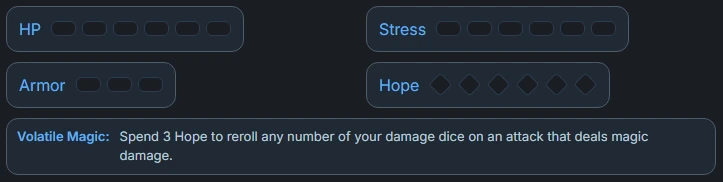
```vitals
styleClass:

# Labels
hp_label: "HP"
stress_label: "Stress"
armor_label: "Armor"
hope_label: "Hope"

# Maximum boxes (numbers or templates)
hp: 10
stress: 6
armor: "{{ frontmatter.armor }}"
hope: 6  # if omitted or 0, defaults to 6

# Optional: override state keys (normally you can omit these)
hp_key: "din_health::Character/Marlowe"
stress_key: "din_stress::Character/Marlowe"
armor_key: "din_armor::Character/Marlowe"
hope_key: "din_hope::Character/Marlowe"

# Optional: extra info under the Hope track
hope_feature:
  - label: "Volatile Magic:"
    value: "Spend 3 Hope to reroll any number of your damage dice on an attack that deals magic damage."
```
Example – Using frontmatter values
---
hp: 12
stress: 6
armor: 3
hope: 6
---

```vitals
styleClass:

hp_label: "HP"
hp: frontmatter.hp

stress_label: "Stress"
stress: "{{ frontmatter.stress }}"

armor_label: "Armor"
armor: "frontmatter.armor"

hope_label: "Hope"
hope: "{{ frontmatter.hope }}"
The block will:
- Read
hp,stress,armor, andhopefrom the note’s frontmatter. - Build the correct number of boxes for each tracker.
- Use its default
*_keyvalues unless you override them.
Working with rest and damage
Because the vitals block uses stable keys:
restcan auto‑detect the HP/Stress/Armor/Hope trackers in the same note and apply Short/Long Rest and resets.damagecan usehp_key/armor_keyto apply tiered damage directly to the same HP/Armor pools.
For most character sheets:
- Put your frontmatter at the top (with
hp,stress,armor, etc.). - Add a
vitalsblock. - Add a
restblock under it (for Short/Long rest & resets). - Add a
damageblock wherever you want a compact damage input.
Configuration – vitals block
Top‑level options:
| Property | Type | Default | Description |
|---|---|---|---|
styleClass | String | none | CSS class applied to the whole vitals grid. |
hp_label | String | "HP" | Label for the HP tracker. |
stress_label | String | "Stress" | Label for the Stress tracker. |
armor_label | String | "Armor" | Label for the Armor tracker. |
hope_label | String | "Hope" | Label for the Hope tracker. |
hp | Number / String | 0 | Number of HP boxes; supports templates and frontmatter.* shorthand. |
stress | Number / String | 0 | Number of Stress boxes; templates allowed. |
armor | Number / String | 0 | Number of Armor boxes; templates allowed. |
hope | Number / String | 6 if missing/0 | Number of Hope diamonds; templates allowed (defaults to 6 if falsy). |
hp_key | String | "din_health::NOTE_PATH" | State key for HP tracker (defaults to the current note path). |
stress_key | String | "din_stress::NOTE_PATH" | State key for Stress tracker. |
armor_key | String | "din_armor::NOTE_PATH" | State key for Armor tracker. |
hope_key | String | "din_hope::NOTE_PATH" | State key for Hope tracker. |
hope_feature | String / Object / Array | none | Optional text or list of {label, value} rows under the Hope tracker. |
footer | (alias) | none | Alias for hope_feature (for backwards compatibility). |
Single trackers (hp, stress, armor, hope)
In addition to the 4‑slot vitals grid, DH‑UI provides standalone tracker blocks:
```hp
```
```stress
```
```armor
```
```hope
```
These are useful when you want to place individual trackers in different parts of the layout (for example, Hope near Experiences, or Armor next to your equipment).
Each standalone tracker supports:
| Property | Type | Default | Description |
|---|---|---|---|
label | String | Block name in uppercase (e.g. "HP") | Text label shown to the left of the boxes. |
state_key | String | none | Storage key for this tracker; required if you want it to persist. |
uses | Number / String | 0 (or 6 for hope if missing) | Number of boxes. Supports templates and frontmatter.* shorthand. |
hp / stress / armor / hope | Number / String | none | Optional aliases for uses; the field matching the block name takes priority when present. |
styleClass | String | none | CSS class applied to the outer tracker container, for custom styling. |
Behavior notes:
- If both
usesand a type‑specific field are provided (e.g.hp:in anhpblock), the type‑specific field wins. hopetrackers default to 6 boxes whenuses/hopeare omitted or resolve to 0.- Like
vitals, filled boxes are stored undertracker:<state_key>and participate indh:tracker:changedevents.
Example – Standalone tracker
```hp
styleClass:
label: "HP"
state_key: "din_health::Character/Marlowe"
uses: "{{ frontmatter.hp }}"
```
Example – Standalone Hope tracker
```hope
styleClass:
label: "Hope"
state_key: "din_hope::Character/Marlowe"
# uses omitted → defaults to 6 diamonds
```
See also
|- Rest – Short & Long – uses these trackers to apply rest moves. |- Full Heal & Reset All – utilities to clear HP or all trackers in a note. |- Damage – tiered damage application that updates HP/Armor. |- State Storage – how hp_key, stress_key, etc. are stored. |- Dynamic Content – using templates to compute tracker sizes.